Huawei’s FusionServer RH2288 V3 is a next-generation 2U, 2-socket rack server. Leveraging the advantages of an efficient design, Supports up to 28 x 2.5-inch or 16 x 3.5-inch hard disks, and supports the latest 12 Gbit/s SAS technology, meeting the requirements for high-bandwidth transmission of Big Data。
hard disk configurations:
• Eight front 2.5-inch SSDs or SAS or SATA HDDs
• Twelve front 3.5-inch SAS or SATA HDDs and two or four rear 2.5-inch or 3.5-inch SSDs or SAS or SATA HDDs
• Twelve front 3.5-inch SAS or SATA HDDs (NVMe model supports four NVMe SSD disks) and two rear 2.5-inch or 3.5-inch SSDs or SAS or SATA HDDs
• Twenty-four front 2.5-inch SAS or SATA HDDs
• Twenty-five front 2.5-inch SSDs or SAS or SATA HDDs and two or three rear 2.5-inch SSDs or SAS or SATA HDDs
Let's have a look at the RH2288 V3 with twelve 3.5-inch hard disks.
 1) Front panel of an RH2288 V3 with twelve 3.5-inch hard disks

2) Front panel of an RH2288 V3 with twelve 3.5-inch hard disks, including four NVMe PCIe SSDs

Hong Telecom Equipment Service LTD provide below 3.5 inch hard disk for huawei Rack server RH2288 V3.
02310QNS BC1HDD01 : General-purpose hard disk -600GB-SAS-10000rpm-2.5 inch-hot-swappable-built-in -3.5-inch handle
02310SJR BC1HDD25 : General-purpose hard disk - 900GB-SAS 6.0Gb / s-10000rpm-2.5 "-64MB and above - Hot Swap - Built-in -3.5-inch handle
02310SJS BC1HDD26 : General Purpose Hard Drives - 1000GB-NL SAS 6Gb / s-7200rpm-2.5 "-64M-Hot Swap-Built-in -3.5" Handle Bar
02310MKV BC1M0NLSAS00 : Universal Hard Disk - 1000GB-NL SAS-7200rpm-3.5 "-64M - Hot Swap - Internal - Handle
02310MKX BC1M0NLSAS01 : General Purpose Hard Drives - 2000GB-NL SAS-7200rpm-3.5 "-64M- Hot Swap - Internal - Handle
02310MLA BC1M0NLSAS02 : General-purpose hard disk - 3000GB-NL SAS-7200rpm-3.5 "-64M- Hot Swap - Internal - Handle
02310UGB BC1HDD36 : General-purpose hard disk -4000GB-NL-SAS 6Gb / s-7200rpm-3.5inch-64MB and above-Hot-Plug-built-in -3.5-inch handle

Huawei’s FusionServer RH2288 V3 chassis and other accessories also provide .
hard disk configurations:
• Eight front 2.5-inch SSDs or SAS or SATA HDDs
• Twelve front 3.5-inch SAS or SATA HDDs and two or four rear 2.5-inch or 3.5-inch SSDs or SAS or SATA HDDs
• Twelve front 3.5-inch SAS or SATA HDDs (NVMe model supports four NVMe SSD disks) and two rear 2.5-inch or 3.5-inch SSDs or SAS or SATA HDDs
• Twenty-four front 2.5-inch SAS or SATA HDDs
• Twenty-five front 2.5-inch SSDs or SAS or SATA HDDs and two or three rear 2.5-inch SSDs or SAS or SATA HDDs
Let's have a look at the RH2288 V3 with twelve 3.5-inch hard disks.

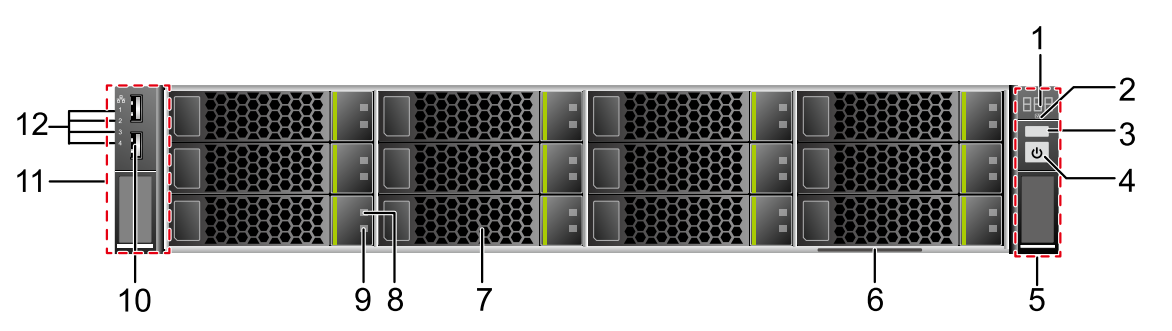
| 1 | Fault diagnosis LED | 2 | Health indicator |
| 3 | UID button/indicator | 4 | Power button/indicator |
| 5 | Right mounting ear | 6 | Label (including the ESN label) |
| 7 | Hard disks (numbered 0 to 11 from top to bottom and from left to right) | 8 | Hard disk fault indicator |
| 9 | Hard disk activity indicator | 10 | USB 2.0 port |
| 11 | Left mounting ear | 12 | Network port link status indicators (numbered 1 to 4 from top to bottom) |
2) Front panel of an RH2288 V3 with twelve 3.5-inch hard disks, including four NVMe PCIe SSDs

| 1 | Fault diagnosis LED | 2 | Health indicator |
| 3 | UID button/indicator | 4 | Power button/indicator |
| 5 | Right mounting ear | 6 | NVMe PCIe SSD yellow indicator |
| 7 | NVMe PCIe SSD green indicator | 8 | Label (including the ESN label) |
| 9 | NVMe PCIe SSDs (numbered 8 to 11 from left to right and from top to bottom) | 10 | Hard disks (numbered 0 to 7 from top to bottom and from left to right) |
| 11 | Hard disk fault indicator | 12 | Hard disk activity indicator |
| 13 | USB 2.0 port | 14 | Left mounting ear |
| 15 | Network port link status indicators (numbered 1 to 4 from top to bottom) | - | - |
Hong Telecom Equipment Service LTD provide below 3.5 inch hard disk for huawei Rack server RH2288 V3.
02310QNS BC1HDD01 : General-purpose hard disk -600GB-SAS-10000rpm-2.5 inch-hot-swappable-built-in -3.5-inch handle
02310SJR BC1HDD25 : General-purpose hard disk - 900GB-SAS 6.0Gb / s-10000rpm-2.5 "-64MB and above - Hot Swap - Built-in -3.5-inch handle
02310SJS BC1HDD26 : General Purpose Hard Drives - 1000GB-NL SAS 6Gb / s-7200rpm-2.5 "-64M-Hot Swap-Built-in -3.5" Handle Bar
02310MKV BC1M0NLSAS00 : Universal Hard Disk - 1000GB-NL SAS-7200rpm-3.5 "-64M - Hot Swap - Internal - Handle
02310MKX BC1M0NLSAS01 : General Purpose Hard Drives - 2000GB-NL SAS-7200rpm-3.5 "-64M- Hot Swap - Internal - Handle
02310MLA BC1M0NLSAS02 : General-purpose hard disk - 3000GB-NL SAS-7200rpm-3.5 "-64M- Hot Swap - Internal - Handle
02310UGB BC1HDD36 : General-purpose hard disk -4000GB-NL-SAS 6Gb / s-7200rpm-3.5inch-64MB and above-Hot-Plug-built-in -3.5-inch handle

Huawei’s FusionServer RH2288 V3 chassis and other accessories also provide .
Comments
Post a Comment